
部署
docker
#network
docker network create --subnet=10.0.0.0/16 zabbix

#db
mkdir /root/zabbix/mariadb
docker run -dit --name zabbix-db \
--net zabbix \
--ip 10.0.0.10 \
--restart=always \
-p 3306:3306 \
-v /etc/hosts:/etc/hosts \
-v /usr/share/zoneinfo/Asia/Shanghai:/etc/localtime \
-v /root/zabbix/mariadb:/var/lib/mysql \
-e MYSQL_ROOT_PASSWORD="passwd" \
mariadb

#server
docker run -dit --name zabbix-server \
--net zabbix \
--ip 10.0.0.100 \
--restart=always \
-p 10051:10051 \
-v /etc/hosts:/etc/hosts \
-v /usr/share/zoneinfo/Asia/Shanghai:/etc/localtime \
-e DB_SERVER_HOST="10.0.0.10" \
-e MYSQL_DATABASE="zabbix" \
-e MYSQL_USER="root" \
-e MYSQL_PASSWORD="passwd" \
zabbix/zabbix-server-mysql:alpine-5.0-latest

#web
docker run -dit --name zabbix-web \
--net zabbix \
--ip 10.0.0.101 \
--restart=always \
-v /etc/hosts:/etc/hosts \
-v /usr/share/zoneinfo/Asia/Shanghai:/etc/localtime \
-e DB_SERVER_HOST="10.0.0.10" \
-e MYSQL_DATABASE="zabbix" \
-e MYSQL_USER="root" \
-e MYSQL_PASSWORD="passwd" \
-p 8080:8080 \
zabbix/zabbix-web-nginx-mysql:alpine-5.0-latest
docker-compose
services:
  db:
    image: mariadb
    container_name: db
    networks:
      work:
        ipv4_address: 10.0.0.10
    environment:
      MYSQL_ROOT_PASSWORD: "passwd"
    ports:
      - "30000:3306"
    volumes:
      - /etc/hosts:/etc/hosts
      - /usr/share/zoneinfo/Asia/Shanghai:/etc/localtime
      - /root/zabbix/mariadb/:/var/lib/mysql/
    restart: always

  zabbix-server:
    image: zabbix/zabbix-server-mysql:alpine-5.0-latest
    container_name: zabbix-server
    networks:
      work:
        ipv4_address: 10.0.0.100
    environment:
      DB_SERVER_HOST: "10.0.0.10"
      MYSQL_DATABASE: "zabbix"
      MYSQL_USER: "root"
      MYSQL_PASSWORD: "passwd"
    ports:
      - "10051:10051"
    volumes:
      - /etc/hosts:/etc/hosts
      - /usr/share/zoneinfo/Asia/Shanghai:/etc/localtime
    restart: always

  zabbix-web:
    image: zabbix/zabbix-web-nginx-mysql:alpine-5.0-latest
    container_name: zabbix-web
    networks:
      work:
        ipv4_address: 10.0.0.101
    environment:
      DB_SERVER_HOST: "10.0.0.10"
      MYSQL_DATABASE: "zabbix"
      MYSQL_USER: "root"
      MYSQL_PASSWORD: "passwd"
    ports:
      - "8080:8080"
    volumes:
      - /etc/hosts:/etc/hosts
      - /usr/share/zoneinfo/Asia/Shanghai:/etc/localtime
      - /root/zabbix/zabbix.conf:/etc/php7/php-fpm.d/zabbix.conf
      - /root/zabbix/php.ini:/etc/php7/php.ini
    restart: always

networks:
  work:
    driver: bridge
    ipam:
      config:
        - subnet: "10.0.0.0/16"
zabbix.conf
[zabbix]
listen = /tmp/php-fpm.sock
clear_env = no
pm = dynamic
pm.max_children = 50
pm.start_servers = 5
pm.min_spare_servers = 5
pm.max_spare_servers = 35
slowlog = /dev/fd/1
php_admin_flag[log_errors] = on
php_value[session.save_handler] = files
php_value[session.save_path]    = /var/lib/php/session
php_value[max_execution_time] = ${ZBX_MAXEXECUTIONTIME}
php_value[memory_limit] = ${ZBX_MEMORYLIMIT}
php_value[post_max_size] = ${ZBX_POSTMAXSIZE}
php_value[upload_max_filesize] = ${ZBX_UPLOADMAXFILESIZE}
php_value[max_input_time] = ${ZBX_MAXINPUTTIME}
php_value[max_input_vars] = 10000
php_value[date.timezone] = "Asia/Shanghai"
php.ini
[PHP]
engine = On
short_open_tag = Off
precision = 14
output_buffering = 4096
zlib.output_compression = Off
implicit_flush = Off
unserialize_callback_func =
serialize_precision = -1
disable_functions =
disable_classes =
zend.enable_gc = On
zend.exception_ignore_args = On
expose_php = On
max_execution_time = 30
max_input_time = 60
memory_limit = 128M
error_reporting = E_ALL & ~E_DEPRECATED & ~E_STRICT
display_errors = Off
display_startup_errors = Off
log_errors = On
log_errors_max_len = 1024
ignore_repeated_errors = Off
ignore_repeated_source = Off
report_memleaks = On
variables_order = "GPCS"
request_order = "GP"
register_argc_argv = Off
auto_globals_jit = On
post_max_size = 8M
auto_prepend_file =
auto_append_file =
default_mimetype = "text/html"
default_charset = "UTF-8"
include_path = ".:/usr/share/php7"
doc_root =
user_dir =
enable_dl = Off
file_uploads = On
upload_max_filesize = 2M
max_file_uploads = 20
allow_url_fopen = On
allow_url_include = Off
default_socket_timeout = 60
[CLI Server]
cli_server.color = On
[Date]
date.timezone = Asia/Shanghai
[filter]
[iconv]
[imap]
[intl]
[sqlite3]
[Pcre]
[Pdo]
[Pdo_mysql]
pdo_mysql.default_socket=
[Phar]
[mail function]
SMTP = localhost
smtp_port = 25
mail.add_x_header = Off
[ODBC]
odbc.allow_persistent = On
odbc.check_persistent = On
odbc.max_persistent = -1
odbc.max_links = -1
odbc.defaultlrl = 4096
odbc.defaultbinmode = 1
[MySQLi]
mysqli.max_persistent = -1
mysqli.allow_persistent = On
mysqli.max_links = -1
mysqli.default_port = 3306
mysqli.default_socket =
mysqli.default_host =
mysqli.default_user =
mysqli.default_pw =
mysqli.reconnect = Off
[mysqlnd]
mysqlnd.collect_statistics = On
mysqlnd.collect_memory_statistics = Off
[OCI8]
[PostgreSQL]
pgsql.allow_persistent = On
pgsql.auto_reset_persistent = Off
pgsql.max_persistent = -1
pgsql.max_links = -1
pgsql.ignore_notice = 0
pgsql.log_notice = 0
[bcmath]
bcmath.scale = 0
[browscap]
[Session]
session.save_handler = files
session.use_strict_mode = 0
session.use_cookies = 1
session.use_only_cookies = 1
session.name = PHPSESSID
session.auto_start = 0
session.cookie_lifetime = 0
session.cookie_path = /
session.cookie_domain =
session.cookie_httponly =
session.cookie_samesite =
session.serialize_handler = php
session.gc_probability = 1
session.gc_divisor = 1000
session.gc_maxlifetime = 1440
session.referer_check =
session.cache_limiter = nocache
session.cache_expire = 180
session.use_trans_sid = 0
session.sid_length = 26
session.trans_sid_tags = "a=href,area=href,frame=src,form="
session.sid_bits_per_character = 5
[Assertion]
zend.assertions = -1
[COM]
[mbstring]
[gd]
[exif]
[Tidy]
tidy.clean_output = Off
[soap]
soap.wsdl_cache_enabled=1
soap.wsdl_cache_dir="/tmp"
soap.wsdl_cache_ttl=86400
soap.wsdl_cache_limit = 5
[sysvshm]
[ldap]
ldap.max_links = -1
[dba]
[opcache]
[curl]
[openssl]
[ffi]
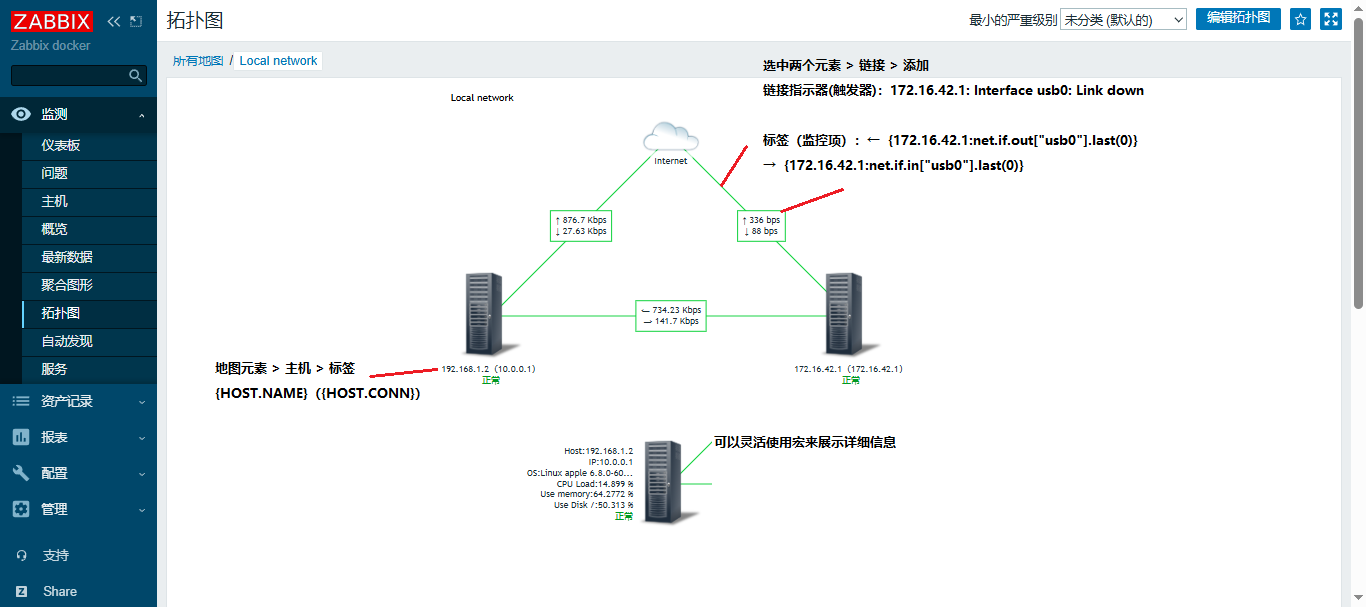
拓扑图
zabbix数据表分区
解决问题:“Zabbix server: Utilization of housekeeper internal processes, in %”
随着时间增长,zabbix库中的历史数据会越来越多,通常情况下我们会在 “管家” >> “历史记录” 中设置数据存储期。每当管家(housekeeper )开始删除海量数据时就会出现告警。
当历史数据表变的非常大之后,优化 housekeeper 配置的效果并不明显。除非减少历史记录保留时间或者对历史表进行分区操作。
HousekeepingFrequency=6           #间隔时间6小时
MaxHousekeeperDelete=10000 #最大删除量分区之前,需要评估zabbix的历史数据量,来决定是按月份分、按天分区和按小时分区。数据量越大单个分区的时间范围应当越小。实现分区前需要关闭“历史记录”的内部管家。
初始化分区
#!/bin/bash
# 针对未分区的zabbix表初始化时执行
# 保留数据3个月

# 配置数据库连接信息
DB_HOST="10.0.0.1"
DB_USER="root"
DB_PASS="passwd"
DB_NAME="zabbix_proxy"

# 定义一个创建分区的函数
create_partition() {
  table=$1

  # 获取当前日期和下个月的时间戳
  #CURRENT_DATE=$(date +'%Y-%m-%d')
  CURRENT_DATE="2025-04-01"
  NEXT_MONTH=$(date -d "$CURRENT_DATE +1 month" +'%Y-%m-%d')
  NEXT_NEXT_MONTH=$(date -d "$CURRENT_DATE +2 months" +'%Y-%m-%d')

  # 计算分区时间戳
  NEXT_MONTH_TIMESTAMP=$(date -d "$NEXT_MONTH" +'%s')
  NEXT_NEXT_MONTH_TIMESTAMP=$(date -d "$NEXT_NEXT_MONTH" +'%s')

  # 计算3个月后的时间戳
  THREE_MONTHS_LATER=$(date -d "$CURRENT_DATE +3 months" +'%Y-%m-%d')
  THREE_MONTHS_LATER_TIMESTAMP=$(date -d "$THREE_MONTHS_LATER" +'%s')

  # 连接数据库并执行 SQL 语句
  mysql -h $DB_HOST -u $DB_USER -p$DB_PASS $DB_NAME <<EOF
  # 创建新的分区
  ALTER TABLE ${table} PARTITION BY RANGE (clock)
  (
    PARTITION p_${table}_$(date -d "$CURRENT_DATE" +'%Y_%m') VALUES LESS THAN ($NEXT_MONTH_TIMESTAMP) ENGINE = InnoDB,
    PARTITION p_${table}_$(date -d "$NEXT_MONTH" +'%Y_%m') VALUES LESS THAN ($NEXT_NEXT_MONTH_TIMESTAMP) ENGINE = InnoDB,
    PARTITION p_${table}_$(date -d "$CURRENT_DATE +2 months" +'%Y_%m') VALUES LESS THAN ($THREE_MONTHS_LATER_TIMESTAMP) ENGINE = InnoDB,
    PARTITION p_${table}_future VALUES LESS THAN MAXVALUE ENGINE = InnoDB
  );

  # 查询表分区信息
  SELECT * FROM information_schema.PARTITIONS WHERE TABLE_NAME = '${table}';

EOF

  echo "Data cleanup and partition creation completed for the table ${table}."
}

# 调用函数并传入表名作为参数
create_partition "history"
#create_partition "history_uint"
#create_partition "history_str"
#create_partition "history_text"
#create_partition "history_log"
#create_partition "history_bin"
#create_partition "trends"
#create_partition "trends_uint"
按月分区
#!/bin/bash
# 执行前需要为数据表分三个区
# 脚本需要在每月初执行
# 保留最近三个月的数据(当前月份、上月和上上月),并删除三个月之前的数据

# 配置数据库连接信息
DB_HOST="10.0.0.1"
DB_USER="root"
DB_PASS="passwd"
DB_NAME="zabbix"

# 定义一个清理分区的函数
partition_cleanup() {
  # 传入表名
  table=$1

  # 获取当前日期和下个月的时间戳
  CURRENT_DATE=$(date +'%Y-%m-01')
  # 三个月之前
  DELETE_MONTH=$(date -d "$CURRENT_DATE -3 month" +'%Y-%m-%d')
  # 下个月
  NEXT_MONTH=$(date -d "$CURRENT_DATE +1 months" +'%Y-%m-%d')

  # 计算分区时间戳 7月设置8月01
  CURRENT_DATE_TIMESTAMP=$(date -d "$NEXT_MONTH" +'%s')

  # 连接数据库并执行 SQL 语句
  mysql -h $DB_HOST -u $DB_USER -p$DB_PASS $DB_NAME <<EOF

  # 删除过期分区(上上上个月)
  ALTER TABLE ${table} DROP PARTITION p_${table}_$(date -d "$DELETE_MONTH" +'%Y_%m');

  # 创建新的分区 最新的分区为:存入下个月一号之前的数据
  ALTER TABLE ${table} ADD PARTITION (
    PARTITION p_${table}_$(date -d "$CURRENT_DATE" +'%Y_%m') VALUES LESS THAN ($CURRENT_DATE_TIMESTAMP) ENGINE = InnoDB
  );

  # 查询表分区信息
  SELECT * FROM information_schema.PARTITIONS WHERE TABLE_SCHEMA = 'zabbix' AND TABLE_NAME = '${table}';

EOF

  python3 /root/script/wx_sendmessage.py "Delete Partition: "p_${table}_$(date -d "$CURRENT_DATE -2 month" +'%Y_%m')" Create Partition: "p_${table}_$(date -d "$NEXT_MONTH" +'%Y_%m')
  echo "Data cleanup and partition creation completed for the table ${table}."
}

# 调用函数并传入表名作为参数
partition_cleanup "history"
partition_cleanup "history_uint"
partition_cleanup "history_str"
partition_cleanup "history_text"
partition_cleanup "history_log"
partition_cleanup "trends"
partition_cleanup "trends_uint"