
打包工具
rpm-build 构建RPM包;
rpmdevtools 在 /root/ 目录下创建 RPM 构建的标准目录结构
yum -y install rpm-build rpmdevtools
# rpmdev-setuptree
源码包
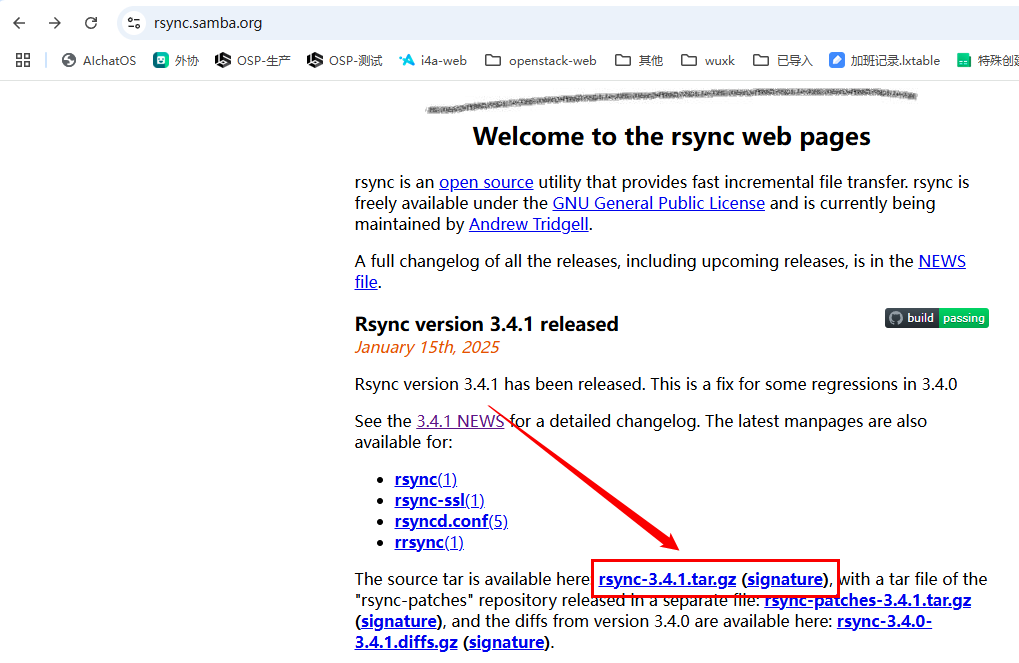
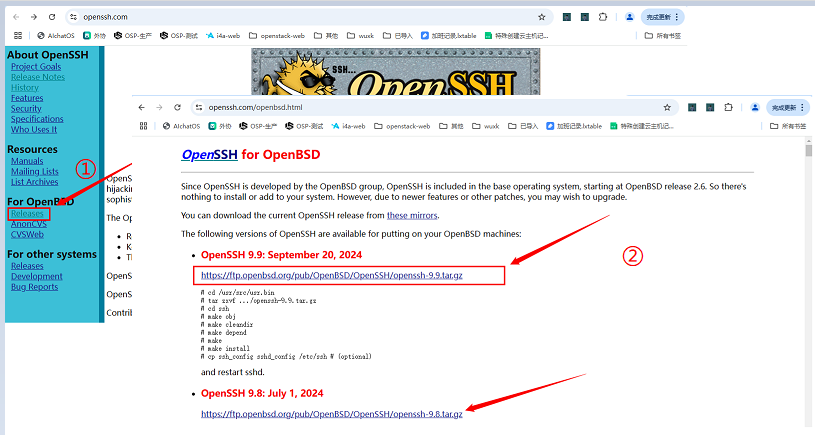
通常是一个压缩包,可以去软件官网、Github或开源站点下载,例如:
rsync
OpenSSH
spec文件
这个文件用于指定源代码、依赖项、构建步骤、安装路径等,指导 rpmbuild 工具生成最终的 RPM 包。
一般可以在源代码压缩包中找到这个文件,例如:
rsync.spec
# tar tf rsync-3.4.1.tar.gz *.spec
rsync-3.4.1/packaging/lsb/rsync.spec

# tar -xf rsync-3.4.1.tar.gz rsync-3.4.1/packaging/lsb/rsync.spec如果没有也可以到Github仓库里搜索spec,例如:
openssh.spec 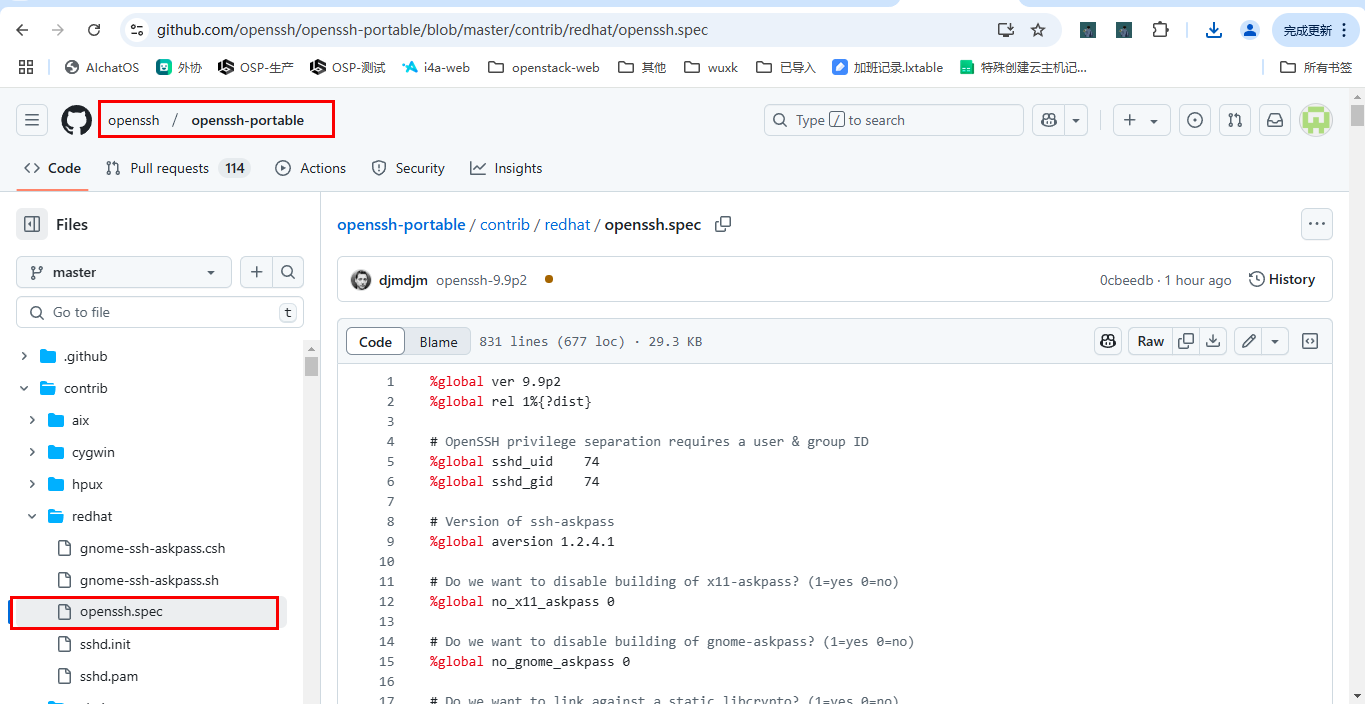
还可以在旧版本的.src.rpm安装包中找到,例如:
# rpm -Uvh openssh-8.0p1-10.el8.src.rpm 2> /dev/null && ls -hl /root/rpmbuild/SPECS/
Updating / installing... 1:openssh-8.0p1-10.el8 ################################# [100%]
total 112K -rw-r--r-- 1 root root 111K Jul 13 2021 openssh.spec
修改spec
官方提供的打包配置,可能不符合实际环境,需要修改配置增加功能,例如:
openssh-9.9p2
在升级ssh的同时避免升级机器上的ssl,要实现必须使用静态库打包。
同时在最新的spec文件中,默认取消了对部分密钥算法的支持,如ssh-rsa;默认对centos7及以下版本配置--without-openssl,导致没有openssl支持;缺少ssh-copy-id命令等。可能会产生各种问题,例如:
缺少id_rsa认证
debug1: Skipping ssh-rsa key /root/.ssh/id_rsa - corresponding algorithm not supported by server缺少其他认证方式
# ssh -Q key
ssh-ed25519
ssh-ed25519-cert-v01@openssh.com
sk-ssh-ed25519@openssh.com
sk-ssh-ed25519-cert-v01@openssh.com

# ssh -Q kex
curve25519-sha256
curve25519-sha256@libssh.org
sntrup761x25519-sha512
sntrup761x25519-sha512@openssh.com
mlkem768x25519-sha256
修改案例:
# 以官方openssh-9.9p2的脚本为例
# 删除这部分 取消脚本是否构建openssl的处理逻辑
# %global without_openssl 0
# build without openssl where 1.1.1 is not available
# %if %{defined fedora} && 0%{?fedora} <= 28
# %global without_openssl 1
# %endif
# %if %{defined rhel} && 0%{?rhel} <= 7
# %global without_openssl 1
# %endif

# 静态库设置为1
# Do we want to link against a static libcrypto? (1=yes 0=no)
%global static_libcrypto 1

#构建openssl
%global no_build_openssl 0

#不打包askpass Do we want to disable building of x11-askpass? (1=yes 0=no) jaina
%global no_x11_askpass 1

#不打包gnome Do we want to disable building of gnome-askpass? (1=yes 0=no) jaina
%global no_gnome_askpass 1

# 增加Source2 openssl源码(需要将 openssl-3.1.4.tar.gz 放在 /root/rpmbuild/SOURCES/ 下)
# 也可以手动单独编译openssl
Source0: https://ftp.openbsd.org/pub/OpenBSD/OpenSSH/portable/openssh-%{version}.tar.gz
Source1: http://www.jmknoble.net/software/x11-ssh-askpass/x11-ssh-askpass-%{aversion}.tar.gz
Source2: https://www.openssl.org/source/openssl-3.1.4.tar.gz

# 编译openssl shared 参数生成共享库(.so 文件) zlib 参数使用 zlib 来压缩数据
mkdir -p %{_sourcedir}/openssl
tar xfz %{SOURCE2} --strip-components=1 -C %{_sourcedir}/openssl
pushd %{_sourcedir}/openssl
./config shared zlib -fPIC
make %{?_smp_mflags}
popd
# 设置openssl编译路径变量
%define openssl_dir %{_sourcedir}/openssl

# Add OpenSSL library 全局库路径
export LD_LIBRARY_PATH="%{openssl_dir}"

# 增加旧版本的加密方式(就是启用ssl)
# --with-ssl-engine enables Libre/OpenSSL's (hardware) ENGINE support
# Remove --without_openssl(3 row) and ADD with-ssl-dir and with-ssl-engine --with-zlib jaina
# 设置openssh编译参数 增加
--with-ssl-dir %configure \
--sysconfdir=%{_sysconfdir}/ssh \
--libexecdir=%{_libexecdir}/openssh \
--datadir=%{_datadir}/openssh \
--with-default-path=/usr/local/bin:/bin:/usr/bin \
--with-superuser-path=/usr/local/sbin:/usr/local/bin:/sbin:/bin:/usr/sbin:/usr/bin \
--with-privsep-path=%{_var}/empty/sshd \
--mandir=%{_mandir} \
--with-mantype=man \
--disable-strip \
--with-ssl-dir="%{openssl_dir}" \

# 必须删掉这三行 configure模块下有"\"为拼合命令,不能有意外字符,比如"#"
# %if %{without_openssl}
# --without-openssl \
# %endif

#删除这三行 remove without_openssl openssl-devel >= 1.1.1
#%if ! %{without_openssl}
#BuildRequires: openssl-devel >= 1.1.1
#%endif

# 打包openssl静态库 需要在这一行添加 -lpthread 参数
perl -pi -e "s|-lcrypto|%{openssl_dir}/libcrypto.a -lpthread|g" Makefile

# 编译ssh-copy-id命令
# 添加
install -m755 contrib/ssh-copy-id $RPM_BUILD_ROOT%{_bindir}/
install -m644 contrib/ssh-copy-id.1 $RPM_BUILD_ROOT%{_mandir}/man1/
# 添加
%files clients
%attr(0755,root,root) %{_bindir}/ssh-copy-id
%attr(0644,root,root) %{_mandir}/man1/ssh-copy-id.1*
%endif

# 添加sshd相关命令
%files
%defattr(-,root,root)
%doc CREDITS ChangeLog INSTALL LICENCE OVERVIEW README* PROTOCOL* TODO
%attr(0755,root,root) %{_libexecdir}/openssh/sshd-auth
%attr(0755,root,root) %{_libexecdir}/openssh/sshd-session
额外的源码包
项目构建过程中可能需要额外的源文件,需要将源码包放到 /root/rpmbuild/SOURCES/ 下,在spec文件中可以看到,例如:
openssh.spec
# 编译openssh需要 openssh-%{version}.tar.gz 和 x11-ssh-askpass-%{aversion}.tar.gz 两个源码包
# cat rpmbuild/SPECS/openssh.spec | grep Source
Source0: https://ftp.openbsd.org/pub/OpenBSD/OpenSSH/portable/openssh-%{version}.tar.gz
Source1: http://www.jmknoble.net/software/x11-ssh-askpass/x11-ssh-askpass-%{aversion}.tar.gz

# 源码包版本号
# cat rpmbuild/SPECS/openssh.spec | grep "global ver"
%global ver 9.9p2

# cat rpmbuild/SPECS/openssh.spec | grep "global aversion"
%global aversion 1.2.4.1
依赖包
打包过程一般是编译生成二进制文件,然后将文件打包为rpm格式,所以需要准备编译所需的环境。
对于C语言系列项目,除了必要的gcc、make、imake工具,还有项目所需的依赖包,通常会在INSTALL.md文件中列有清单,例如:
rsync
# cat rsync-3.4.1/INSTALL.md | grep -A 11 CentOS
 - For CentOS (use EPEL for python3-pip):
> sudo yum -y install epel-release
> sudo yum -y install gcc g++ gawk autoconf automake python3-pip
> sudo yum -y install acl libacl-devel
> sudo yum -y install attr libattr-devel
> sudo yum -y install xxhash-devel
> sudo yum -y install libzstd-devel
> sudo yum -y install lz4-devel
> sudo yum -y install openssl-devel
> python3 -mpip install --user commonmark也有例外情况,如openssh源码文件中没有INSTALL.md
openssh
可以查看openssh.spec中的构建需求(BuildRequires)
# cat rpmbuild/SPECS/openssh.spec | grep ^BuildRequires
BuildRequires: perl
BuildRequires: openssl-devel >= 1.1.1
BuildRequires: /bin/login
BuildRequires: glibc-devel, pam
BuildRequires: /usr/include/X11/Xlib.h
BuildRequires: libXt-devel
BuildRequires: imake BuildRequires: gtk2-devel
BuildRequires: pkgconfig
BuildRequires: krb5-devel
BuildRequires: krb5-libs
也可以直接进行打包,观察依赖报错再来安装,例如:
# rpmbuild -ba rpmbuild/SPECS/openssh.spec
error: Failed build dependencies:
    /usr/include/X11/Xlib.h is needed by openssh-9.9p2-1.el7.x86_64
    libXt-devel is needed by openssh-9.9p2-1.el7.x86_64
    imake is needed by openssh-9.9p2-1.el7.x86_64
    gtk2-devel is needed by openssh-9.9p2-1.el7.x86_64
    krb5-devel is needed by openssh-9.9p2-1.el7.x86_64
OpenSSL
查看源码包中的INSTALL.md文件,其中详细说明了各个系统的依赖情况 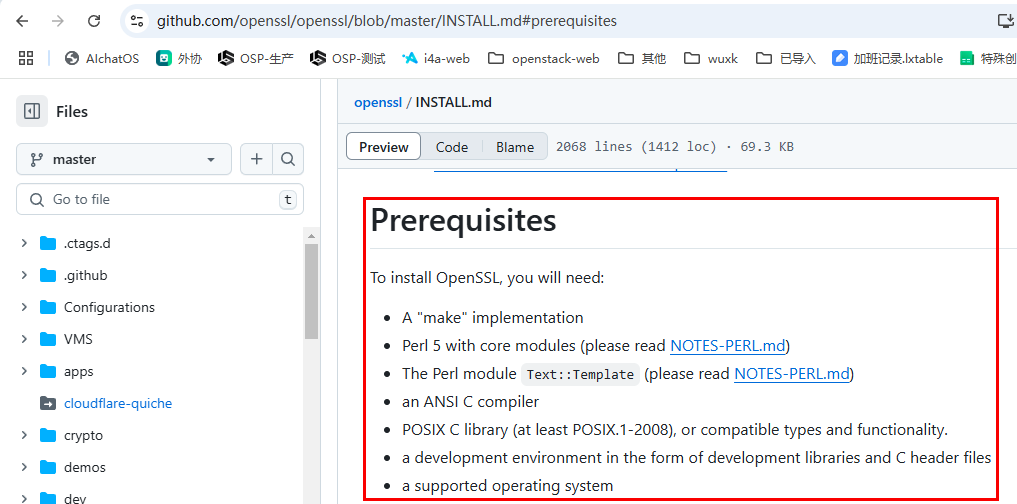
打包
rpmbuild命令会编译源码后生成 .src.rpm 和 .rpm 文件,常用的打包命令如下:
openssh
# 打包时设置 static_openssl 变量为1 代表打包后的 rpm 包自带openssl静态库,不依赖系统openssl版本
# rpmbuild -ba rpmbuild/SPECS/openssh.spec --define "static_openssl 1"
rsync
# 默认打包命令
# rpmbuild -ba rpmbuild/SPECS/rsync.spec
测试
openssh
# ssh -V
OpenSSH_9.9p2, OpenSSL 3.0.16 11 Feb 2025
# sshd -V
OpenSSH_9.9p2, OpenSSL 3.0.16 11 Feb 2025

# sh -Q key
ssh-ed25519
ssh-ed25519-cert-v01@openssh.com
sk-ssh-ed25519@openssh.com
sk-ssh-ed25519-cert-v01@openssh.com
ecdsa-sha2-nistp256
ecdsa-sha2-nistp256-cert-v01@openssh.com
ecdsa-sha2-nistp384
ecdsa-sha2-nistp384-cert-v01@openssh.com
ecdsa-sha2-nistp521
ecdsa-sha2-nistp521-cert-v01@openssh.com
sk-ecdsa-sha2-nistp256@openssh.com
sk-ecdsa-sha2-nistp256-cert-v01@openssh.com
ssh-rsa
ssh-rsa-cert-v01@openssh.com

# ssh -Q kex
diffie-hellman-group1-sha1
diffie-hellman-group14-sha1
diffie-hellman-group14-sha256
diffie-hellman-group16-sha512
diffie-hellman-group18-sha512
diffie-hellman-group-exchange-sha1
diffie-hellman-group-exchange-sha256
ecdh-sha2-nistp256
ecdh-sha2-nistp384
ecdh-sha2-nistp521
curve25519-sha256
curve25519-sha256@libssh.org
sntrup761x25519-sha512
sntrup761x25519-sha512@openssh.com
mlkem768x25519-sha256
rsync
# rsync --version
rsync  version 3.4.1  protocol version 32
Copyright (C) 1996-2025 by Andrew Tridgell, Wayne Davison, and others.
Web site: https://rsync.samba.org/
Capabilities:
    64-bit files, 64-bit inums, 64-bit timestamps, 64-bit long ints,
    socketpairs, symlinks, symtimes, hardlinks, hardlink-specials,
    hardlink-symlinks, IPv6, atimes, batchfiles, inplace, append, ACLs,
    xattrs, optional secluded-args, iconv, prealloc, stop-at, no crtimes
Optimizations:
    no SIMD-roll, no asm-roll, openssl-crypto, no asm-MD5
Checksum list:
    xxh128 xxh3 xxh64 (xxhash) md5 md4 sha1 none
Compress list:
    zstd lz4 zlibx zlib none
Daemon auth list:
    sha512 sha256 sha1 md5 md4

rsync comes with ABSOLUTELY NO WARRANTY.  This is free software, and you
are welcome to redistribute it under certain conditions.  See the GNU
General Public Licence for details.
打包脚本
https://wuxk.ip-ddns.com:12002/archives/opensshda-bao-rpmjiao-ben